Sunday, April 02, 2023

Move VFP to Another Monitor

Like many developers, I have two monitors (some have even more). I like to open Outlook, VFP, and Visual Studio on my primary monitor and my browser, Word, Excel, and other apps on the other one. Sometimes, though, I want two VFP windows open, one on the primary monitor and one on the other, because I'm working on two different versions of an application at the same time. Or sometimes I have VS open on the primary monitor and want VFP open on the other one so I can work on both at the same time.

After opening VFP and dragging it to the other monitor for the 100th time, a lightbulb came on: use a hotkey to toggle VFP between the two monitors. I created this as a Thor tool and assigned Alt-2 to it. Here's the code:
Lparameters lxParam1

****************************************************************
****************************************************************
* Standard prefix for all tools for Thor, allowing this tool to
*   tell Thor about itself.

If Pcount() = 1						  ;
		And 'O' = Vartype (lxParam1)  ;
		And 'thorinfo' == Lower (lxParam1.Class)

	With lxParam1
	
		* Required
		.Prompt		   = 'Move VFP to Other Monitor'
		
		* Optional
		Text to .Description NoShow
Move VFP to Other Monitor
		EndText 
		.CanRunAtStartUp = .F.

		* These are used to group and sort tools when they are displayed in menus or the Thor form
		.Source		   = "Doug's Tools"
	
	Endwith

	Return lxParam1
Endif

If Pcount() = 0
	Do ToolCode
Else
	Do ToolCode With lxParam1
Endif

Return

****************************************************************
****************************************************************
* Normal processing for this tool begins here.                  
Procedure ToolCode
	Lparameters lxParam1
		if _screen.Left > 1900
			_screen.Left = 2
		else
			_screen.Left = 1922
		endif _screen.Left > 1900
		_screen.Visible     = .T.
		_screen.Top         =   54
		_screen.Width       = 1916
		_screen.Height      =  950
		_screen.WindowState = 2
			&& this is needed to force thw window to draw properly
		_screen.WindowState = 0
EndProc 
Your dimensions might be different so adjust this code as necessary. Also, you might not want the tool to be in the Thor menu under "Doug's Tools", so set Source to something appropriate.

UPDATE: it turns out a Windows hotkey will do this: Win+Shift+Arrow Key. Thanks to Jochen Kirstätter (JoKi) for pointing this out.

New VFPX Project: List Manager

Many tables have columns containing a small range of values. For example, for a customer type column in a customer table, the acceptable values might be "Business", "Consumer", and "Government". Your choices for data entry into such columns are:
  • Allow the user to type a value. This is bad idea because the user may not know what the acceptable values are or may type them incorrectly.

  • Hard-code the values in a combobox. Adding values to the list means changing the program and deploying an update.

  • Create lookup tables for the values. If there are a lot of such columns, that's a lot of tables and maintenance forms for those tables to create.
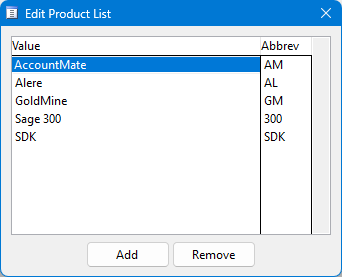
List Manager is a new VFPX project that manages lists of lookup values and provides controls so users can select values from these lists.  A single table contains all of the lookup values for an application and a single maintenance form allows users to add, edit, or remove values.


Users can select a single value from a specific type of lookup:


or select multiple values into a comma-separated string:


Saturday, March 11, 2023

Virtual Fox Fest 2023 (May)

Virtual Fox Fest 2023 (May) is a one-day event on Wednesday, May 10, 2023. We have some great speakers delivering great sessions, live chatting during presentations, and getting to hang out virtually with new and old friends. This event will feature classic sessions (from previous conferences), updated for 2023, along with at least one brand new session. More details here: https://virtualfoxfest.com.

Registration is open! Details, deadlines and cost are available on our Web site. You register for the conference here: https://geekgatherings.com/Registration. Don't procrastinate, get this done today!

We’re planning Southwest Fox in Arizona this October. We expect to announce our plans for a hybrid (in-person and virtual) fall conference some time in April.

Wednesday, December 28, 2022

Upsize VFP Free Tables to SQL Server

The VFPX Upsizing Wizard allows you to upsize the tables in a database container to a SQL Server database. It can be used visually by running UpsizingWizard.app or programmatically; see TestEngine.prg that comes with the Upsizing Wizard for an example.

One thing the Upsizing Wizard doesn't do is support free tables. The new Upsizer utility gives the Upsizing Wizard the ability to do that. I've used it on decent sized data sets (more than 100 tables with 10 GB of data total) and it works very well. One thing I like is that I can run it over and over to upsize to the same database; that allows me to refresh the SQL Server database with changes in the VFP data while we work on upsizing a VFP application.

Tuesday, December 27, 2022

Updated Upsizing Wizard

I released an update for the Upsizing Wizard that fixes a few bugs and adds some new features. Some of these were suggested by Rick Borup in his Switching to SQL Server session at Virtual Fox Fest 2022 (October), including:

  • Optionally creating default values for all columns so fields that don't allow nulls and aren't listed in an INSERT statement don't prevent the statement from executing.
  • Optionally exporting table and field comments to the MS_Description extended property.
  • Using Varchar(max) rather than Text as the default mapping for Memo.

See the 2022.12.27 section of the Releases section of the Upsizing Wizard VFPX repository for details on all changes.

You can install the new version by cloning the repository, downloading the files from the repository, or using Thor Check for Updates.

And stay tuned: later this week, I'm going to release a new tool that extends the Upsizing Wizard to support free tables and uses SQL Bulk Copy for even better upsizing performance.

Monday, November 14, 2022

Bulk Copying VFP Data to SQL Server

The VFP Upsizing Wizard does a great job of upsizing a VFP database to SQL Server. However, after doing the initial upsizing, you may wish to re-upload the content of one or more tables with doing a complete re-upsize. A new tool, SQLBulkCopy, available from https://github.com/DougHennig/SQLBulkCopy, is great for that.

Thursday, October 27, 2022

Virtual Fox Fest 2022 (October) Follow-up

Here are some follow-up notes about Virtual Fox Fest 2022 (October):

  • Videos for all presentations are now available on YouTube for free to everyone, as our contribution to the VFP community. Be sure to subscribe to our channel.
  • If you didn't attend Virtual Fox Fest and want materials (white papers and sample code) for the presentations, go to  https://geekgatherings.com/Registration and "register" for the conference. You're not really registering since it's over, but in the Registration Fees section of the registration page, you'll see "Virtual Fox Fest Session Materials" for previous events. There's also an opportunity to sponsor Virtual Fox Fest, which means your name will be listed on our Sponsors page.
  • If you didn't attend Virtual Fox Fest, check out our Facebook page and see what you missed, then plan to attend a future one so you can join in the fun.

Tuesday, September 13, 2022

Virtual Fox Fest 2022 (October): Don't Forget or Regret

Thanks to all who have registered for Virtual Fox Fest 2022 (October). Early registrants help us plan ahead. This is another friendly reminder to the rest of you that it takes just a few minutes to register.

We're really excited about this year's Virtual Fox Fest line-up and we know you will be, too. You can find all the details:

You can order your Virtual Fox Fest gear anytime. If you don't like the items or colors we've chosen, click on any item as a starting point and then click "Customize This Product" to choose the product and color you really want.

Virtual Fox Fest is October 13th, 19th, and 25th, 2022.

Monday, August 29, 2022

Virtual Fox Fest 2022 (Oct): Early-Bird ends in 2 days

Last call! (we want to make sure we have your attention)

The Early-Bird discount ends midnight (North American Eastern time) on Wednesday, which is just a couple of days away. Here is the direct link to get registered: http://geekgatherings.com/registration.

Virtual Fox Fest is October 13, 19, and 25, 2022.

Tuesday, August 16, 2022

Virtual Fox Fest Registration Reminder

Thanks to all who have already registered for Virtual Fox Fest; we appreciate your support and our speakers are excited to share their sessions with you soon. Please register for Virtual Fox Fest before September 1st, our Early-Bird deadline. We know you are interested in saving $50, and we would appreciate processing the bulk of the registrations in August. Perfect synergy! As a bonus, we won't process your payment until September. It takes just a few minutes to register. Virtual Fox Fest is October 13, 19, and 25, 2022.