Happy Towel Day!
4 months ago
Thanks to Matthew Olson, who did most of the work figuring how to implement this, I've added support for Modern Authentication to SFMail, a VFPX project providing a library to send emails from VFP applications.
Basic Authentication is simply providing a user name and password to connect to a mail server. More and more mail services have already or are soon moving away from Basic Authentication and implementing Modern Authentication, also known as OAuth2. Modern Authentication uses a two-step process to connect to a mail server: first obtaining a token (a string) from a web server, then using that token to connect to the mail server.
Gmail and Office 365 are two of the services moving away from Basic Authentication sometime in 2022. The SFMail repository has detailed documentation for working with Office 365. I started investigating Gmail, but according to https://support.google.com/cloud/answer/9110914, access to Gmail is considered to be a "Restricted scope" and requires undergoing an annual independent, third-party security assessment. That seems like a pain, so I'm not planning on doing much with Gmail yet. However, based on what (little) I know about OAuth2, I believe that SFMail will work with Gmail.
Cesar Chalom is one of the best VFP developers in the world, and a great contributor to the VFP community. FoxCharts, FoxyPreviewer, and GDIPlusX are just some of the things he's created or contributed to.
A couple of years ago, he released another tool: FoxyDialogs. This cool add-on provides an incredible amount of control over MESSAGEBOX-style dialogs, so much so that you may do away with creating custom forms for some types of dialogs. For example, one line of code creates this dialog:
FoxyDialog("Covid-19 crazy warning - See the timer -->", ;
    "Please stay home!", ;
    " - Clean your hands often." + CHR(13) + ;
    " - Avoid close contact with people who are sick." + CHR(13) + ;
    " - Stay at home as much as possible." + CHR(13) + ;
    " - Put distance between yourself and other people." + CHR(13) + ;
    " - If you have a fever, cough and difficulty breathing, seek medical attention." + CHR(13), ;
    "!2", ; && Exlamation default with yellow backgound (default)
    "\More Info_99,I agree_5341,Leave me!_89,Ok_116802", ; && Button captions, 1st button disabled
    2, ;  && Default button
    "8000,<SECS> secs.") && Timeout

However, recently on Foxite, Daniele Rieffoli of Italy and Tomislav Sokol of Croatia posted about solutions they'd found to the problem. The problem is that both FoxyDialogs and ctl32 use VFP2C32.fll, a library that provides low-level functions that make it easier to work with some Windows API functions. Unfortunately, they use different versions of VFP2C32.fll, causing the conflict. (You won't find the actual FLL with the ctl32 files; ctl32_vfp2c32.prg, which is called by ctl32 components, creates it in the user's temporary files folder if it doesn't already exist.) If a ctl32 component is used before FoxyDialogs, it loads the older VFP2C32.fll, and FoxyDialogs errors on the BINDEVENTSEX statements in its DialogCreated function (BINDEVENTSEX is one of the functions in VFP2C32.fll) because it expects different parameters than the older library does. Using the newer VFP2C32.fll doesn't work because ctl32_vfp2c32.prg calls InitVFP2C32 and that function no longer exists in the newer library.
The solution is actually simple: use the version that comes with FoxyDialogs and SET LIBRARY TO it at startup before anything in ctl32 is used. When a ctl32 component is used, it calls ctl32_vfp2c32.prg, but that PRG sees that VFP2C32.fll has already been loaded, so it does nothing. None of the ctl32 components I tested had a problem with the newer library, so now they both work together.
As you may know, Matt Slay passed away in 2021. He was a great contributor to the Fox community and VFPX and is greatly missed.
The last tool created by Matt and his friend and frequent collaborator Jim Nelson is Object Explorer, which provides an explorer form to view members of the specified object. Jim has kindly agreed to include this tool in VFPX, so it's available there now.
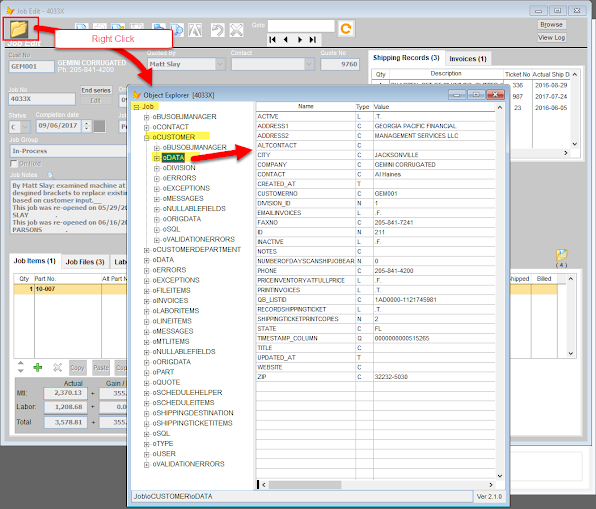
I made a few tweaks to the original code to fix some minor issues I ran into; see the "2022-02-28" release notes for details. I also created my own copy of Explorer.scx named SFObjExplorer.scx, with Desktop = .T. and this code in Init so it uses Segoe UI rather than the default Arial:
Lparameters toObject, tcObjectName, tcFormCaptionSuffix
dodefault(toObject, tcObjectName, tcFormCaptionSuffix)
This.SetAll('FontName', 'Segoe UI')
This.TreeContainer.oleTree.Font.Name = 'Segoe UI'
Matt Slay was a great contributor to the Fox community and a great guy. Sadly, he passed away in October 2021. He is sorely missed.
However, his legacy lives on: the VFPX administrators have forked his projects and changed the project list links to the new repositories so community members can continue Matt's work.
Our one-day Virtual Fox Fest 2022 (May) will be Thursday, May 5, 2022. It still has the same great features everyone loves about VFF: great speakers delivering great sessions, live chatting during presentations, and getting to hang out virtually with new and old friends. This event will feature classic sessions from previous conferences, updated for 2022.
We’re still discussing whether to hold Southwest Fox in Arizona this fall. We hope to announce our plans for a fall conference before our May event.
SQL Server Management Studio typically takes a minute or so to start on my machine. I just figured it was a slow app, but then I saw it load much faster on another machine. Searching for a solution led me to Microsoft SQL Server Management Studio is too Slow (archive.org), which nicely solved the problem. Now it starts up in five seconds.
(As an aside, I use a hosts file from Steven Black's https://github.com/StevenBlack/hosts to help block malware and adware.)
You may be aware that Thor can survive a CLEAR ALL. (If you aren’t familiar with Thor, you really should be: https://github.com/VFPX/Thor.) While that seems impossible, it’s actually pretty simple but does require that Thor be designed in a certain way.
As you know, CLEAR ALL nukes all objects (among other things; see the VFP help for a complete list of what it affects). And yet, after executing CLEAR ALL, if you choose any of the functions in the Thor menus or use one of the hot keys you’ve assigned in Thor, it works. How is that possible?
The secret is that _SCREEN and _VFP are the only objects that survive CLEAR ALL. Object members of those objects don’t survive but non-object members retain their values. When Thor starts up, it creates a new property of _SCREEN called cThorDispatcher and puts some code into that property. Near the start of that code is the following:
If PemStatus(_Screen, 'oThor', 5) = .F. or Vartype(_Screen.oThor) # 'O'
_Screen.AddProperty('oThor', Newobject ('oThor', 'Thor.vcx', lcThorApp, lcThorFolder))
EndIf
So, if there’s no oThor member of _SCREEN or it doesn’t contain an object, that property is created and the main Thor class is instantiated into it.
How does that help? It turns out that most places that call Thor functionality don’t execute code like _SCREEN.oThor.SomeMethod(). Instead, they use code like this:
loThor = execscript(_screen.cThorDispatcher, 'Thor Engine=')
loThor.SomeMethod()
Of course, Thor had to be designed to support that: every place that calls Thor methods has to go through the Thor dispatcher rather than calling them directly.
Ingenious!
Here are some follow-up notes about Virtual Fox Fest 2021 (October):

 Posts
All Comments
Posts
All Comments