Thursday, May 15, 2014

Southwest Fox and Southwest Xbase++ 2014 Speakers and Sessions Announced

Speakers and sessions for both conferences have been announced. Like we try to do every year, we have several new speakers this year: Matthew Olson and Phil Sherwood at SWFox and Peter Alderliesten and a to-be-named (but well-known to the community) speaker at SWXbase++.

We’re also glad to have back several speakers who haven’t presented at Southwest Fox in a few years: Bo Durban, Toni Feltman, Jim Nelson, and Kevin Ragsdale.

I’m really excited by the lineup of sessions this year. Some that I’m personally looking forward to are:

Registration opens soon; send an email to info@geekgatherings.com if you want us to email you when it’s ready. See you in October!

Wednesday, May 07, 2014

Stonefield Query Enterprise

Stonefield Software Inc. is excited to announce the release of Stonefield Query Enterprise, the newest version of our award-winning Stonefield Query product line.

Stonefield Query Enterprise is a complete rewrite from scratch using the C# language for the back-end engine components and ASP.NET MVC for the web front-end. The new version allows us to take advantage of the latest technologies.

Here are some of the features of this new product:

  • Web UI: the current version of Stonefield Query is a desktop application. While it works great for the over 200,000 people using Stonefield Query, many of you want reporting for your web applications. Stonefield Query Enterprise gives you that solution.
  • New reporting features: Stonefield Query Enterprise has many new features that are difficult or impossible to add to the current version. Some of these new features include:

    • Support for sub-reports
    • Displaying HTML and rich text with full formatting
    • Availability of other types of controls such as bar codes, QR codes, and check boxes
    • Sorting on group totals
    • Support for multiple column fields in cross-tab reports
    • Better localization of reports: headings appear in the language of the user running the report, not the one who created it
    • And many other great new features
  • Rich API: every aspect of Stonefield Query Enterprise is exposed through our API. This makes it dead simple to integrate with your own application. You can create and run reports programmatically, manage security, or dynamically update the data dictionary as necessary.
  • Extendible: you’ve always been able to extend and control the features of Stonefield Query through scripting. In Stonefield Query Enterprise, plugins take this to the next level. Because plugins have full access to the Stonefield Query object model, you can customize Stonefield Query Enterprise in ways you could only dream of before.
  • Support for multi-tenant applications: Stonefield Query Enterprise was designed to work in a multi-tenant environment. Whether you have one database with row-level security for all customers or one database per customer, Stonefield Query Enterprise has you covered. Users can only see the records and reports for their own company. Of course, it works just fine in a single customer environment too.
  • Updated Stonefield Query Studio: the developer part of Stonefield Query got a facelift too. It integrates with your custom plugins and functions so they’re available for expressions. Join trees give you fine control over how indirectly related tables are joined. You can now preview the contents of calculated fields and virtual tables and test joins between real and virtual tables. Value converters, either built-in or your own, change how the contents of a field appears in a report.
  • Source code: we provide the source code for the web UI, allowing you to customize it to suit your needs. Changes can be a simple as altering styles in CSS files for a different look to changing controllers and views for different workflow or implementing different security rules.

Of course, Stonefield Query Enterprise still has the features that made Stonefield Query one of the few true user reporting solutions available, including:

  • Ease-of-use: Your users don't have to know what a join is, let alone how to create a join for a particular set of tables. They don't have to know the names of tables and fields. They don't have to know how the data is stored. They simply tell Stonefield Query what they want and it figures out how to get the data they need. The simple “wizard” interface allows them to create reports in minutes, not hours.
  • Report scheduling: Create as many schedules to run as many reports at any time as you wish, making report deployment a snap.
  • Multi-database support: Stonefield Query can run reports on data stored in different databases, even if they use different engines. For example, you can create a report that shows customer information from a Microsoft SQL Server database and project information from an Oracle database. Create consolidation reports that pull, for example, invoices from different company databases onto a single report.
  • Configurable: Customize Stonefield Query for your application. The data dictionary describes what the databases Stonefield Query can access look like: the tables, fields, and relationships between the tables; captions for tables and fields; output formatting for fields; and so on. Customize the behavior of Stonefield Query by changing configuration settings, such as whether users can schedule reports.
  • Brandable: Easily create a private labeled or branded version of Stonefield Query. This allows you to distribute Stonefield Query as your own branded product, so your users won't know it's Stonefield Query from Stonefield Software; they'll think it's something you created just for them. This also allows you to sell your branded version for whatever price fits your business model.
  • Localizable: Stonefield Query is fully localizable. Every dialog caption and message displayed to the user in Stonefield Query is defined in resource files. You can easily create multi-lingual versions of Stonefield Query, with each user working in the language they're most comfortable with.

Check out Stonefield Query Enterprise today. If you want to try it with your own data, download the demo from http://stonefieldquery.com/ (choose “Web version” from the Download menu). If you’d rather try out the report designer without installing anything, click the “Try it now” button at http://stonefieldquery.com/ to run the demo on our web site against the famous Northwind sample database.

Updated Web Site

Stonefield Query isn’t a single product; rather, it’s a family of products. On one hand, we have customized versions for specific applications, such as Stonefield Query for Sage 300 and Stonefield Query for ACT!. On the other, we have the Stonefield Query SDK, which any developer or consultant can use to create a customized reporting solution for any application. (In fact, we used the SDK to create the customized versions.) Unfortunately, that made our web site a bit of a mixed bag: we had to make it useful to two different audiences, which led to some awkward navigation. As a result, we’ve split the site into two:

Links in the Solutions menu of both sites take you to the other one.

We also used this as an opportunity to revamp the site, making it more modern and responsive on mobile devices.

Check out the new sites and let us know what you think; your feedback is important to us and much appreciated.

Tuesday, March 18, 2014

Southwest Fox 2014 Call for Speakers Reminder

Just a reminder that session proposals for Southwest Fox and Southwest Xbase++ 2014 are due by 8 AM EDT this Friday, March 21. If you’re interested in speaking, please see http://www.swfox.net/callforspeakers.aspx for instructions. We look forward to hearing from you.

Thursday, March 06, 2014

Call for Speakers - Southwest Fox and Southwest Xbase++ 2014

We've issued the Call for Speakers for both conferences. If you are interested in presenting at either conference, please check out http://www.swfox.net/callforspeakers.aspx.

Friday, November 29, 2013

Making Thor Even More Useful

I’ve been using Thor since day one. In case you haven’t heard of it, Thor is the most crazily–useful tool ever invented for VFP developers. Created by a few developers (mostly Jim Nelson) and available as a VFPX project, Thor is described as “a tool for managing add-on tools in the IDE, managing menus and hot key assignments for IDE Tools.” While that’s true, it’s the wide array of add-ons for Thor that makes it the incredible productivity booster it is.

One tool I use a dozen times a day is one originally created by Andy Kramek and Marcia Akins that adds a variable name to the LOCAL statement if it isn’t already there. The cool thing about this tool is that it picks up the variable name from the text where the cursor is located. So, I can type something like “lcMyVariable”, hit Alt-6 (the hotkey I assigned to the tool in Thor), and voila: lcMyVariable is added to the LOCAL statement. No more scrolling to the top of the code, manually adding the variable name, then scrolling back down to where I was (or more likely, forgetting to add it to LOCAL so now it’s a PRIVATE variable by default). Even more interesting is that Andy and Marcia didn’t create this tool for Thor. Instead, I simply took their code and added a little wrapper to it so it’s now a Thor tool.

One tool I knew Thor has had for a while is called Create LOCALs. It’s similar to Andy and Marcia’s tool except it goes through an entire block of code, finds all variables, and adds them all to the LOCAL statement. I thought this would be a cool tool but when I tried it, one thing it did was a deal-breaker for me: it sorts the variables alphabetically rather than listing them in the order they’re first used. I know some of you are probably thinking, “Wow, how anally retentive do you have to be to care about the order variables are listed in”, and the answer is “You know how anal I am if you’ve ever seen my code”. However, it turns out that there’s a practical reason why variables should be listed in the order used: in an error log created with LIST MEMORY, variables appear in the order declared, which can be very useful in determining where in a routine an error occurred. (To learn how to do that, you’ll have to come to Southwest Fox next year and attend my “Fix Problems Fast with Advanced Error Handling and Instrumentation Techniques” session.) So, I continued to use the “one variable at a time” tool.

Earlier this month, I sat in on Tamar Granor’s Make Thor Your Own session. In this session, she explained how to create your own Thor tools and work with plugins for existing tools. She used the Create LOCALs tool as an example, showing how its behavior is controlled with a plugin and how she modified the plugin to work the way she wanted. That turned on a light bulb for me; maybe I could do something similar so that tool would work the way I want.

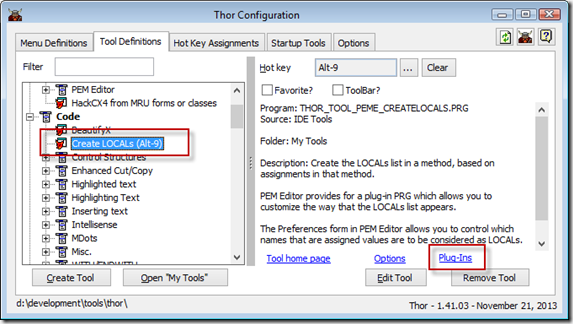
This turned out to be incredibly easy to do. First, I opened the Thor Configuration utility by choosing Configure from the Thor menu. I selected the Tool Definitions page and chose the Create LOCALs tool, then clicked the Plug-Ins link:
SNAGHTML27e02bbf

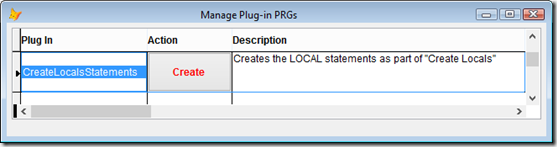
The Manage Plug-in PRGs dialog appeared:
SNAGHTML27e288ba

I clicked Create to create PEME_CreateLocalsStatements.PRG in the Thor\Tools\My Tools folder of the directory where Thor is installed. This is my copy of the plugin code for the Create LOCALs tool that supersedes the one that comes with Thor. Looking over the code, I quickly found this:

Asort (laLocals, 1, -1, 0, 0)

Commenting out that line was all that was needed to make this tool work the way I want. However, it occurred to me that perhaps the tool would be more useful generically if sorting was user-configurable. Another thing Tamar showed in her session was how some tools have an options page and how to create your own.

To see the options for this tool, click the Options link when Create LOCALs is selected in the Tool Definitions page or select the Options page and choose Create Locals:
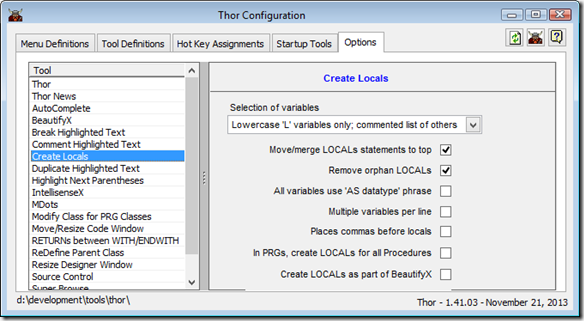
SNAGHTML27e977d0

As you can see, Create LOCALs already has a few options that configure the behavior of the tool, but not one for sorting. After a bit of digging, I found that the options for the tool are defined in the clsCreateLocals class in Thor_Options_Createlocals.VCX in the Thor\Tools\Procs folder. It turns out if you copy the VCX and VCT files to the My Tools folder, Thor uses that copy rather than the original. So, it was a simple matter to modify that class and add a “Sort variables alphabetically” checkbox.

SNAGHTML27f786df

I put the following code into the Init method of the checkbox to retrieve the existing value of the option, which defaults to true the first time:

llValue = execscript(_screen.cThorDispatcher, 'Get Option=', 'lSort', ;
    'CreateLocalStatement')
This.Value = nvl(llValue, .T.)

The InteractiveChange method saves the setting:

execscript(_screen.cThorDispatcher, 'Set Option=', 'lSort', ;
    'CreateLocalStatement', This.Value)

Because I used a BaseCheckbox from the same VCX as the class for the checkbox, and the Refresh method of that class expects the cControlSource property to be filled in, which it isn’t here, I added a comment to that method in the checkbox to override the default behavior.

I then made this change in PEME_CreateLocalsStatements.PRG:

*** DH 11/29/2013: don't sort variables unless we're supposed to
*Asort (laLocals, 1, -1, 0, 0)
llSort = nvl(execscript(_screen.cThorDispatcher, 'Get Option=', ;
    'lSort', 'CreateLocalStatement'), .T.)
if llSort
    Asort (laLocals, 1, -1, 0, 0)
endif llSort

Now variables are only sorted if the “Sort variables alphabetically” option is turned on.

As you can see in the first screen shot above, I defined Alt-9 as the hotkey for the Create LOCALs tool. So now, I don’t have to worry about creating local variables as I type code. I just press Alt-9 before I close the editor window and like magic, all the variables appear in the LOCAL statement at the top of the code. This saves me even more time that before.

If you haven’t started exploring Thor, I strongly suggest you do so. Its rich set of tools are guaranteed to have something that will increase your productivity.

Friday, October 25, 2013

2013 Lifetime Achievement Award Recipients

At the keynote of the 2013 Southwest Fox conference, we announced this year’s recipients of the FoxPro Lifetime Achievement Award(although I wasn’t there in person, I got to do it via Skype). Because of ties in voting, there were several recipients this year:

  • Janis (formerly Jim) Booth
  • Ted Roche
  • Sergey Berezniker
  • Mike Feltman, which was especially poignant because his wife Toni, a former recipient herself, presented it to him.

See the FoxPro Community Lifetime Achievement Award topic on the Fox Wiki for their photos and bios.

Congratulations, Janis, Ted, Sergey, and Mike. All are well deserving of this award.

Update: you can watch the award presentation in the streaming video of the keynote starting at 28:30.

2012 Southwest Fox Speaker Award

Cathy Knight (then Cathy Pountney) was the top-ranked Southwest Fox 2008 speaker, as measured by attendee evaluations. Her friends Toni Feltman and Jody Meyer felt that she deserved an award for this accomplishment, so they created one and presented it to her at the keynote of the 2009 conference. They filled the cup with chocolates because that’s Cathy’s favorite food (not dessert, food).

Since then, it’s been a tradition for the winner to present the award to the next year’s top-ranked speaker, so Cathy presented it to Rick Schummer for being the top speaker in 2009, Rick presented it to me for 2010, and I had the pleasure of presenting the award for 2011 to Rick Borup. At Southwest Fox 2013, the award went full circle when Rick presented it to Cathy for being the top speaker in 2012. Once again, the cup was filled with chocolates.

Congratulations, Cathy! There aren’t a lot of double-award winners out there.

Update: you can watch the award presentation in the streaming video of the keynote starting at 20:00.

2013 VFPX Administrators’ Award

The VFPX Administrators’ Award is an annual award given by the VFPX Administrators (Craig Boyd, Rick Schummer, Jim Nelson, and I) to recognize those people who made outstanding contributions to the VFP community through their projects on VFPX. The nominees this year were:

At the keynote for Southwest Fox 2013, the award was given to both Luis and Rodrigo. Both worked on two complex projects that add a lot of value to VFP. Congratulations to both and thanks for all your efforts in making VFPX the future of VFP.

Update: you can watch the award presentation in the streaming video of the keynote starting at 22:10.

Thursday, October 10, 2013

Seriously Bummed Out

Southwest Fox is one of my favorite times of the year. Rick, Tamar, and I work hard for almost a whole year getting everything organized so that by the time we actually get to the conference, there isn’t that much left to do. That gives us a chance to do our own sessions, sit in on other great sessions, hang out with old and new friends, and just generally have a lot of fun. It’s such a blast reconnecting with folks I only see once a year or even less. That’s why I’m so bummed out right now –- I won’t be going to Southwest Fox this year.

A medical issue has arisen over the past couple of weeks and as a result my doctor doesn’t want me travelling while we try to get this thing under control. It isn’t too serious –- just annoying and tiring enough that being at a conference will be a bit of a struggle. I’m confident we’ll get things worked out (and I’m already doing better this week than last), so it’s really just a case of lousy timing.

To make me feel even worse about missing the conference, there are several people I’ve never met or haven’t seen in many years coming to SWFox who I was looking forward to seeing.

My session time slots are being covered off thanks to Rick Borup, David Giard, and Tamar who stepped up at the last minute to fill in with extra sessions and Rick Schummer (gotta clarify given the number of Ricks we have as speakers <s>) who’s doing an extra instance of one of his sessions. An updated schedule will be available on the web site and via Guidebook later today. Thanks also to Rick and Tamar who had to pick up my duties. I couldn’t ask for better partners.

I’ll miss you all next week and am envious of the fun you’ll have. Have a great time in Phoenix and I’ll see you all next year!