As I hinted at in my previous blog post, sleeping was an issue for me at Southwest Fox this year. I woke up at 5:00 on Saturday, my head buzzing with what I wanted to say at the closing session on Sunday. I read for an hour or so to calm down.
I had the first timeslot of the day (moving it back from 8:00 to 8:30 last year was a very popular decision!) and presented my Cool Controls for Your Applications session. I was even more nervous about this than the ThemedControl session; again, I’d practiced it several times and had it down cold, but would attendees think the controls were as cool as the title promised? Fortunately, that turned out to be the case; the evals were even more positive than for the ThemedControls session and I’ve had several emails from folks afterward who told me they’ve already implemented some of the ideas presented in their applications.
I started by explaining that this session had the same theme as my ThemedControls session: there’s no excuse for creating boring-looking VFP apps. I presented each of the controls in this session in a similar manner: a demo of what it looks like, a brief discussion of how it works (with a detailed discussion in the white paper for those interested in looking under the hood), and a cookbook-like explanation of how to implement it.
The first was a simple control I wrote several years ago but is used in lots of places (not only my apps but also in the VFPX PEM Editor): a splitter that allows the user to adjust the relative sizes of the resizable controls (listboxes, editboxes, grids, etc.) in your forms. Next, I showed a control I call a “combotree” because it combines a combobox with a TreeView to provide a control you can use to display hierarchical data or a lot of checkboxes without taking up much screen real estate. This control is also used in PEM Editor and lots of places in my apps. I then showed the VFPX PopMenu project and how it can be used to create Microsoft Office-like menus in your apps. I spent some time showing how to use Paul Mrozowski’s RCSDateTimePicker as a replacement for the Microsoft DateTime Picker ActiveX control for date data entry, including some enhancements I added allowing you to select a range of dates. Next up was Ctl32_BalloonTip, one of the many controls in Carlos Alloatti’s definitely cool Ctl32 library. Ctl32_BalloonTip replaces plain old boring tooltips with attractive “balloon” tips that you also have more control over. I finished by showing how another of Carlos’s controls, Ctl32_ProgressBar, gives a Vista/Windows 7 appearance to progress bars in your apps. The images below show some of these controls in action:
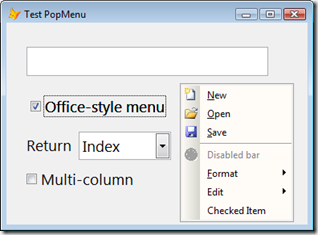
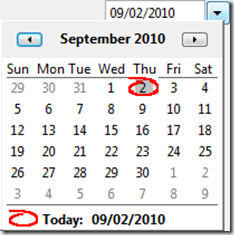
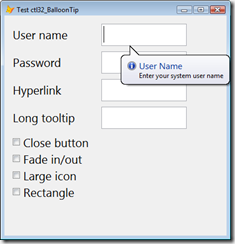

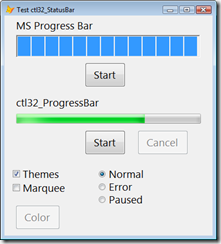
I ended up chatting with a few people so I missed a session in the next timeslot. As we told everyone in the keynote, that’s perfectly OK: you often get more out of a conference by the discussions with fellow developers than in the actual sessions, and every session has a white paper so you still have the content. I then presented my ThemedControls session for the second time in the slot before lunch.
After lunch, I went to watch Uwe Habermann and Venelina Jordanova present their Silverlight for Internet Applications session. I’ve known Uwe and Venelina for several years, having met them at conferences in Prague and Germany. I liked the way they presented this session: they took turns talking and led the other into the next topic by asking questions an attendee would ask. I didn’t know much about Silverlight but was planning on attending the post-conference VFP to Silverlight workshop, so this was a good overview of Silverlight and even went into details on creating your first project.
The next session was Tamar’s Collections: Managing Information the Object-Oriented Way. I’ve worked with collections for years, but I saw Tamar’s session on business objects last year and this session was “part 2” of that, plus I enjoy Tamar’s take on things and figured I could pick up a few tips. During the session, I played a trick on Rick Schummer, who was right behind me. He had to leave the room for a couple of minutes, so he left his laptop on the seat and his bag on the floor. As soon as he walked out of the room, I quickly grabbed both and hid them under my chair. Even better, someone came in a moment later and sat on his now abandoned chair. When Rick came in, he looked panic-stricken: he thought the other person was sitting on his laptop, and looked all around for his stuff. I didn’t let him suffer for too long, and he let out a very relieved laugh when I handed him his laptop and bag. Hmm, I hope he doesn’t go all “Boyd” on me for this prank. As for Tamar, she did a nice job explaining the basics of collections and then showed a strong practical example of their use: a VFP version of the popular Sudoku game that uses several collection to manage cells, blocks, rows, columns, and the game itself.
The last session of the day I attended was Toni Feltman’s The Pomodoro Technique session. I was looking forward to seeing this; Steve Bodnar had mentioned Pomodoro to me a couple of years ago so I was interested in learning what it was about. Toni discussed the problems of concentration and focus in a world of email, Twitter, Facebook, telephone calls, and teammate interruptions. Pomodoro was designed to allow you to plan your day in advance and focus on a set of tasks in 25-minute intervals, followed by a 3 to 5 minute break to catch up or relax before starting the next one. The idea is to boost your productivity by not letting distractions pull your concentration away from the tasks you need to get done without eliminating them completely. I know several attendees and speakers who’ve started using Pomodoro since seeing Toni’s presentation. I haven’t yet but hope to once I return from the German DevCon next week.
Rick, his wife Therese, his parents, and I went to a Mexican restaurant at the SanTan mall for an excellent dinner. I had something I’ve never tasted before: a chile relleno enchilada, which was REALLY good. However, the main event of the night was up next: racing at the F1 Race Factory. As usual, a good-sized crowd of Southwest Fox folk showed up for fun and competition. You can see photos from F1 taken by Venelina and Therese on the Southwest Fox photo page. For the past several years, Cathy Pountney, Rick, and I have had a friendly competition at F1 (“friendly” meaning there’s no exchange of gunfire). Cathy actually started it in 2006 by trashing Rick and I to all who’d listen after she beat us that year. Once again, the competition was fierce. None of us actually came in first (Rick Strahl is the perennial winner, followed this year by Cathy’s boyfriend Jim Knight), but we don’t care: it’s a race within a race for us. I had the fastest lap this year, followed by Rick and then Cathy. Because the F1 printer was down, we couldn’t see who had the fastest average lap (another measurement we use), so we assumed it was Rick since that’s a title he usually wins.
Afterward, we headed back to the hotel pool to regale the others with our stories: who took who into the wall, who cut off who in the corner, and so on. I called it a night a little after midnight.


 Posts
Posts